Showing posts with label converter. Show all posts

Sunday, August 1, 2010

How to make movie of jpeg images?

It's just very easy to make video/movie on Linux operating system (in my case Fedora).

You can try using 'convert' command in the terminal.

convert *.jpg movie.mpg

Or, you can also try: (just replace the variable with '$' with true values)

mencoder mf://$PIC_DIR/\*.jpg -mf w=$WIDTH:h=$HEIGHT:fps=$FPS:type=jpg -ovc lavc -lavcopts vcodec=mpeg4 -oac copy -o $DEST_VIDEO

Hope that helps!

Tuesday, January 26, 2010

Windows 7 Ultimate

Wazzup everyone, been busy for awhile, Christmas, New Year, outing, beach, work, and some more. Well, it's been really busy but fun, really really fun.

Now, I'll share with you my experience on this latest Operating System (OS), by Microsoft Corporation, Windows 7 (Ultimate). This one is even better than XP and Vista indeed. Well of course you wouldn't expect a newer version to be less better that the older one right?

Windows 7 is the latest public release version of Microsoft Windows, a series of operating systems produced by Microsoft for use on personal computers, including home and business desktops, laptops, netbooks, tablet PCs, and media center PCs. Windows 7 was released to manufacturing on July 22, 2009, and reached general retail availability on October 22, 2009, less than three years after the release of its predecessor, Windows Vista. Windows 7's server counterpart, Windows Server 2008 R2, was released at the same time.

Top New Features:

1. Touch your screen to resize a photo or map or to quickly scroll through your files.
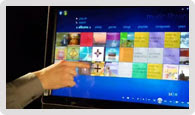


2. Send media from your PC to compatible devices on your home network.
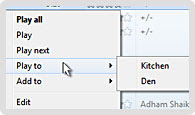


3. Away from home? Access photos and more on your home PC.



4. Share files, music—even printers—in just four clicks.
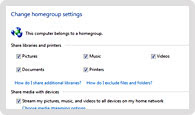


5. Make and share movies and slide shows quickly and easily.
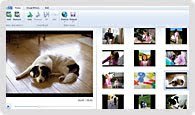


and many more... Just have a copy of it if you want to know more.

Friday, July 10, 2009

Transformers 2: Revenge of the Fallen Download

Hi everyone, do you want to watch Transformers 2 - Revenge of the Fallen? Well, me too, honestly I haven't watched it yet, but I will very soon.

The battle for Earth has ended but the battle for the universe has just begun. After returning to Cybertron, Starscream assumes command of the Decepticons, and has decided to return to Earth with force. The Autobots believing that peace was possible finds out that Megatron's dead body has been stolen from the US Military by Skorpinox and revives him using his own spark. Now Megatron is back seeking revenge and with Starscream and more Decepticon reinforcements on the way, the Autobots with reinforcements of their own, may have more to deal with then meets the eye.

So much of this, you can check this link for downloads:
http://www.mininova.org/search/?search=Transformers%3A+Revenge+of+the+Fallen
or watch online streaming:
http://www.novamov.com/video/wprq5hflb1u15

Enjoy everyone, Thanks!

Sunday, June 29, 2008

How to convert video format using ffmpeg?

FFmpeg allows Linux users to convert video files easily between a variety of different formats.

Today's affordable digital video cameras have placed the power of digital recording within most people's reach. Unfortunately, this has been accompanied with a corresponding increase in the variety of file formats and codecs available. Some of these formats are more efficient than others, and some are less encumbered by proprietary licensing restrictions. So, having the ability to convert from one format to another is a great help, as you can decide what format you are comfortable with and use that one instead of being restricted to a specific file format.

FFmpeg is a simple and straightforward application that allows Linux users to convert video files easily between a variety of different formats. In this article, I walk you through installing FFmpeg and provide a few instructive examples to demonstrate the range of applications for which it can be used.

Full post can be found here: www.linuxjurnal.com

Live Traffic Feed