I had a problem on my computer before. I accidentally damage MBR (Master Boot Record) on my PC and wasn't able to use my system for several days.
After a thorough research on the internet I was able to restore grub and boot back to my linux system.
Here are the steps I did:
1. Download a Live CD on you linux distro.
2. Burn it on a CD/DVD/USB.
3. Use it as first boot on you computer.
4. When you are on it, you can gain complete access to your lost Linux OS.
5. Mount you linux system into /mnt/my-linux-os
- su
- mkdir /mnt/my-linux-os
- mount /dev/sda{any number if you have partitioned your disk} /mnt/my-linux-os
6. Type 'grub-install /dev/sda' (to install Grub to the MBR of the 1st HD)
7. Restart and you should get the boot menu.
Or, you can also try this one:
1. Boot your Live CD.
2. Use terminal, login as root: su
3. type the command 'grub' and press enter
4. type root (hd0,0)
- or if your not sure the right one, you can type 'find /boot/grub/stage1'. This will output something like '....(hd0,5)'. use that one in this step.
5. type setup (hd0)
- just remove the comma and the next number.
6. type quit
3. Reboot.
Showing posts with label ntfs. Show all posts
Showing posts with label ntfs. Show all posts
Sunday, August 1, 2010

Tuesday, January 26, 2010
Windows 7 Ultimate
Wazzup everyone, been busy for awhile, Christmas, New Year, outing, beach, work, and some more. Well, it's been really busy but fun, really really fun.
Now, I'll share with you my experience on this latest Operating System (OS), by Microsoft Corporation, Windows 7 (Ultimate). This one is even better than XP and Vista indeed. Well of course you wouldn't expect a newer version to be less better that the older one right?
Windows 7 is the latest public release version of Microsoft Windows, a series of operating systems produced by Microsoft for use on personal computers, including home and business desktops, laptops, netbooks, tablet PCs, and media center PCs. Windows 7 was released to manufacturing on July 22, 2009, and reached general retail availability on October 22, 2009, less than three years after the release of its predecessor, Windows Vista. Windows 7's server counterpart, Windows Server 2008 R2, was released at the same time.
Top New Features:
1. Touch your screen to resize a photo or map or to quickly scroll through your files.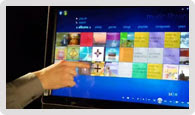
1. Touch your screen to resize a photo or map or to quickly scroll through your files.

2. Send media from your PC to compatible devices on your home network.

3. Away from home? Access photos and more on your home PC.

4. Share files, music—even printers—in just four clicks.

5. Make and share movies and slide shows quickly and easily.

and many more... Just have a copy of it if you want to know more.
Monday, October 6, 2008
How to mount NTFS (Windows file system) in Fedora 7?
As root from the console or xterm session type: yum install fuse ntfs-3g
Example /etc/fstab file line entry;
Code:
Edit: It is the letter 'L' in lowercase. Some users thought it was 1(numeric one). There is a space between fdisk and -l.
This will attach the Windows C drive to the /mnt directory. Now you can see the files and folders in your Windows C Drive at /mnt. You can add an entry in your fstab file to mount the Windows directory every time you boot Linux.
Example /etc/fstab file line entry;
Code:
/dev/sda1 /media/Windows ntfs-3g auto,users,uid=0,gid=500,umask=000,rw 0 0#
mount /dev/sda1 /mnt/windows

now you can access your ntfs file in /mnt/windows directory.

or
Step 1: Type the below command in the Terminal as root
fdisk -lEdit: It is the letter 'L' in lowercase. Some users thought it was 1(numeric one). There is a space between fdisk and -l.
You will see tabular data like below.

We only want information from Device and System columns. In the first row, we see a device /dev/sda1 with the file system HPFS/NTFS. This is the Windows XP C drive. Let's access this drive using the mount command. The mount command helps us to attach the Windows C Drive to any directory on the Linux file system.
Step 2:
mount /dev/sda1 /mntThis will attach the Windows C drive to the /mnt directory. Now you can see the files and folders in your Windows C Drive at /mnt. You can add an entry in your fstab file to mount the Windows directory every time you boot Linux.
Subscribe to:
Posts (Atom)


